
The ML Lifecycle Is Just CI/CD With Extra Steps (And That's the Point)
If you come from a traditional software engineering background, the machine learning development lifecycle will feel both familiar and alien. Familiar because it follows the same build-test-deploy-monitor loop you already know. Alien because the thing you're building, a model, is uniquely sensitive to data in ways your Node.js API never was.
I just finished the AWS course "Developing Machine Learning Solutions" as part of my AI Practitioner (AIF-C01) prep, and the biggest takeaway is this: ML is not magic. It is an engineering discipline with a well-defined lifecycle. Understanding that lifecycle is what separates people who talk about AI from people who ship it.
The ML Lifecycle: Seven Phases, One Loop
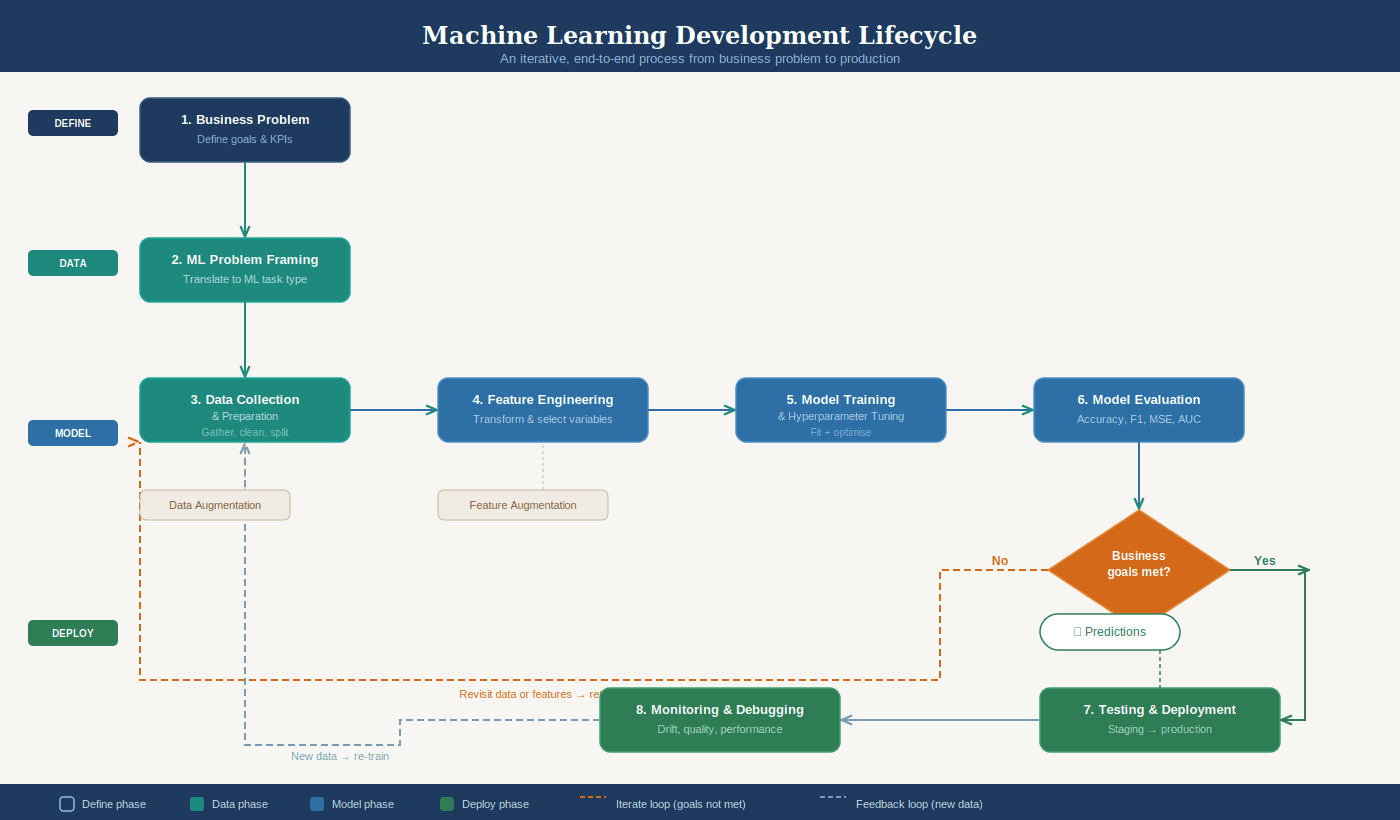
The ML development lifecycle breaks down into seven phases:
Business goal identification. What problem are we solving and what does success look like?
ML problem framing. Can this actually be solved with ML? Do we have the data?
Data processing. Collection, cleaning, feature engineering.
Model development. Training, tuning, evaluation.
Deployment. Getting the model into production to serve predictions.
Monitoring. Watching for degradation in real time.
Retraining. The model drifts, the data changes, you go again.
The critical insight is that this lifecycle is iterative, not linear. You will loop back from evaluation to feature engineering, from monitoring to retraining, constantly. If you think of ML as "train once, deploy forever," you will fail.
Think of it like a CI/CD pipeline, but the artifact you're deploying (the model) degrades over time as the real world changes underneath it. Your REST API doesn't suddenly get worse because customer behavior shifted last quarter. An ML model absolutely does.
The Amazon Call Center Example
The course walks through a great real-world case: Amazon's call center routing.
The original system was a static phone menu. Press 1 for returns, press 2 for Kindle, and so on. With hundreds of millions of calls per year, this led to customers hitting the wrong specialists, unnecessary transfers, higher costs, and worse customer experience.
The ML solution reframed this as a multiclass classification problem: given a customer's data (recent orders, Prime membership, Kindle ownership), predict which agent skill set they need.
This is supervised learning. They had historical data with labeled outcomes (which agent actually resolved the call). They cleaned the labels aggressively, merging similar ones and removing inaccurate ones. They split the data into training, validation, and test sets. They tuned hyperparameters like the learning rate.
The result: customers routed to the correct agent on the first attempt. Transfers dropped. Experience improved.
What stands out here is that the ML part was only one piece. The heavy lifting was in problem framing ("this is multiclass classification"), data cleaning ("merge these Kindle labels"), and feature engineering ("what signals predict routing?"). The actual model training was almost the easy part.
Amazon SageMaker AI: The Full Toolkit
AWS consolidates the entire ML workflow into Amazon SageMaker AI, a fully managed service organized into six capability categories.
Data preparation starts with SageMaker Data Wrangler, a low-code tool for importing, transforming, and analyzing data. For heavier workloads, SageMaker Studio Classic integrates with Amazon EMR and AWS Glue for large-scale processing. The Processing API lets you run scripts with frameworks like scikit-learn or PyTorch on managed infrastructure.
Feature management lives in SageMaker Feature Store, a centralized place to create, share, and retrieve features across teams.
Training and evaluation offers multiple paths depending on your needs. SageMaker Canvas provides no-code AutoML for users who don't write code. SageMaker JumpStart gives you pretrained open-source models ready to deploy or fine-tune. Training Jobs let you use built-in algorithms or bring your own, with SageMaker handling the compute infrastructure and storing artifacts in S3.
Model tuning happens through SageMaker Experiments (track different combinations of data, algorithms, and parameters) and Automatic Model Tuning (run many training jobs with different hyperparameters to find the best configuration).
Deployment uses SageMaker Inference with four options: real-time (low latency), batch transform (large datasets, no persistent endpoint), asynchronous (large payloads up to 1 GB, processing times up to one hour), and serverless (on-demand, ideal for sporadic traffic that can tolerate cold starts).
Monitoring is handled by SageMaker Model Monitor, which continuously or periodically checks data quality, model quality, bias drift, and feature attribution drift against your defined thresholds.
The key concept for the exam: SageMaker is the answer when AWS asks about a fully managed ML service that covers the entire workflow.
Model Sources: Four Levels of Effort
SageMaker supports four approaches to building models, from least to most effort:
Pretrained models through JumpStart require the least work. You pick a model, optionally fine-tune it, and deploy.
Built-in algorithms cover supervised learning (classification, regression), unsupervised learning (clustering, anomaly detection), image processing, and text analysis. These scale well for large datasets.
Pre-made framework images let you bring your own code using supported frameworks (TensorFlow, PyTorch, scikit-learn, MXNet) when no built-in option fits.
Custom Docker images give maximum flexibility but require the most effort. You package everything yourself.
For the exam, understand this spectrum. AWS wants you to know when to use a pretrained model versus building from scratch. The general rule: start with the least effort option and only increase complexity when your use case demands it.
Evaluating Model Performance
Model evaluation is where the engineering discipline really shows. After training, you partition data into three sets: training (to learn), validation (to tune), and test (to verify before production).
Model fit tells you what's going wrong. Overfitting means the model memorized training data but fails on new data. Underfitting means the model is too simple to capture the patterns at all. The goal is a balanced model with low bias and low variance.
The bullseye analogy makes this click. Imagine throwing darts at a target. Bias is how far your throws land from the center. Variance is how spread out your throws are. You want low bias (close to center) and low variance (tightly grouped). High bias means you're consistently missing. High variance means you're all over the place.
For classification problems, the confusion matrix is the foundation. It maps predictions against reality across four quadrants: true positives, true negatives, false positives, and false negatives. From there:
Accuracy = (TP + TN) / total. Simple but misleading when your dataset is imbalanced.
Precision = TP / (TP + FP). Use when false positives are expensive. Spam filters care about precision because you don't want good emails marked as spam.
Recall = TP / (TP + FN). Use when false negatives are expensive. Medical diagnosis cares about recall because missing a sick patient is catastrophic.
AUC-ROC plots multiple confusion matrices at different thresholds to show the tradeoff between true positive rate and false positive rate. An AUC of 0.5 is random guessing. The curve should hug the upper-left corner.
For regression: MSE (mean squared error) measures average prediction error. R-squared measures how much variance the model explains (0 to 1, higher is better). Both provide different perspectives and both matter.
And all of these metrics must connect back to the business KPIs defined in phase one. A model with 99% accuracy is useless if it doesn't actually reduce call transfers or increase sales.
MLOps: DevOps for Machine Learning
MLOps is where everything comes together. It applies DevOps principles to ML systems, covering the full lifecycle from development through deployment, monitoring, and maintenance.
Why not just use regular DevOps? Because ML models are sensitive to data changes. A model deployed today might degrade next month as customer behavior shifts. You need processes specifically designed for continuous training, not just continuous deployment.
MLOps introduces four continuous practices:
Continuous Integration (CI) extends testing to data and models, not just code.
Continuous Delivery (CD) automatically deploys newly trained models.
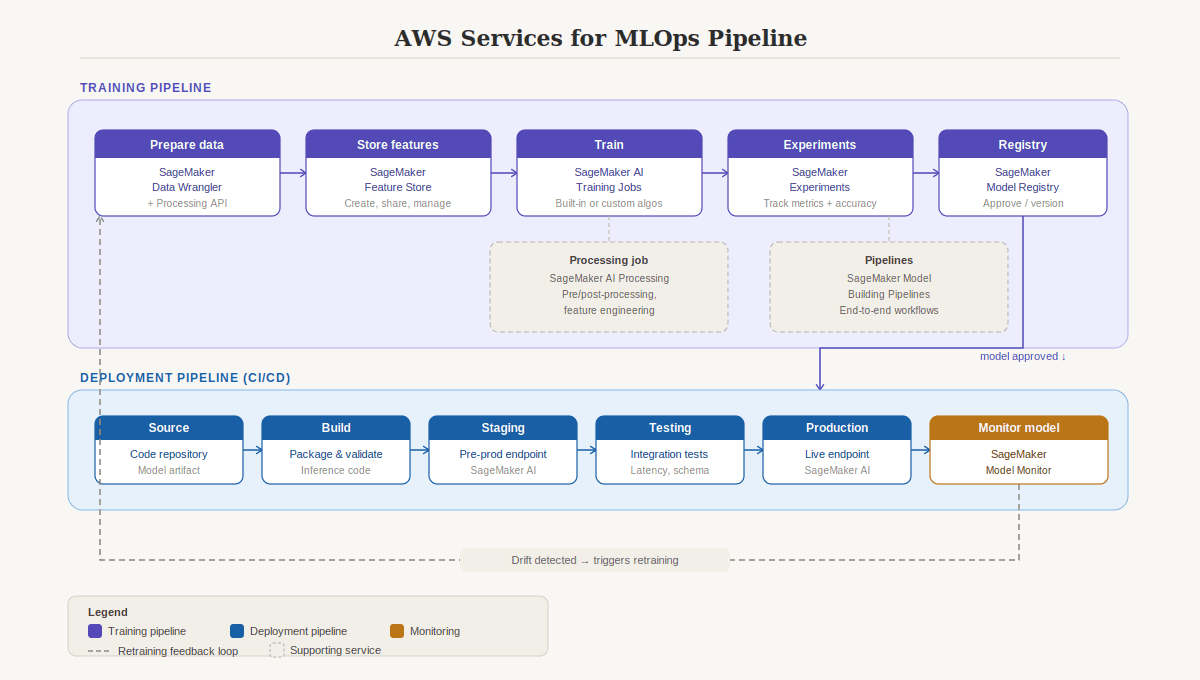
Continuous Training (CT) automatically retrains models when performance drops or new data arrives.
Continuous Monitoring (CM) tracks data quality, model quality, and business metrics in production.
The AWS MLOps pipeline maps to specific services: Data Wrangler and Processing API for data prep, Feature Store for feature management, Training Jobs for training, Experiments for evaluation, Model Registry for versioning and approval, SageMaker Inference for deployment, Model Monitor for monitoring, and Model Building Pipelines for orchestrating the entire workflow.
Model governance is the other critical piece. Documentation, secure access, compliance, bias checks, and structured approval processes before any model hits production. This is especially important for the exam's Responsible AI domain.
Practical Takeaways
For the AIF-C01 exam: Know the ML lifecycle phases in order. Know the SageMaker service for each phase. Know when to use precision vs. recall. Know the four deployment options and when each is appropriate. Know why MLOps exists and what CT (continuous training) adds beyond standard CI/CD.
For building real systems: The lifecycle is iterative. Plan for retraining from day one. Start with the least complex model approach (pretrained > built-in > framework > custom). Connect every model metric back to a business KPI, or you're optimizing in the dark.
For fullstack developers entering ML: You already understand CI/CD, APIs, monitoring, and infrastructure-as-code. ML adds data sensitivity, model drift, and continuous training on top of what you know. The gap is smaller than you think.