
How I locked v1 scope: MoSCoW + 2D story mapping + risk-weighted effort estimates

The sixteen spec docs are done. I'm looking at thirty-five user stories spread across six functional areas: patients, sessions, payments, invoicing, scheduling, and the waitlist.
All of them feel like they belong in v1. That's the trap.
The question isn't what to build. Four months of discovery and spec work answered that. The question is what to not build yet, and in what order, and whether I can defend those calls in six months when something that got deferred turns out to be the thing I needed.
Sorting by consequence, not by preference
MoSCoW is the starting point. Must, Should, Could, Won't. I've seen it used as a priority ranking where everything ends up as Must because everything feels important. That version is useless.
The version that works treats each tier as a consequence test:
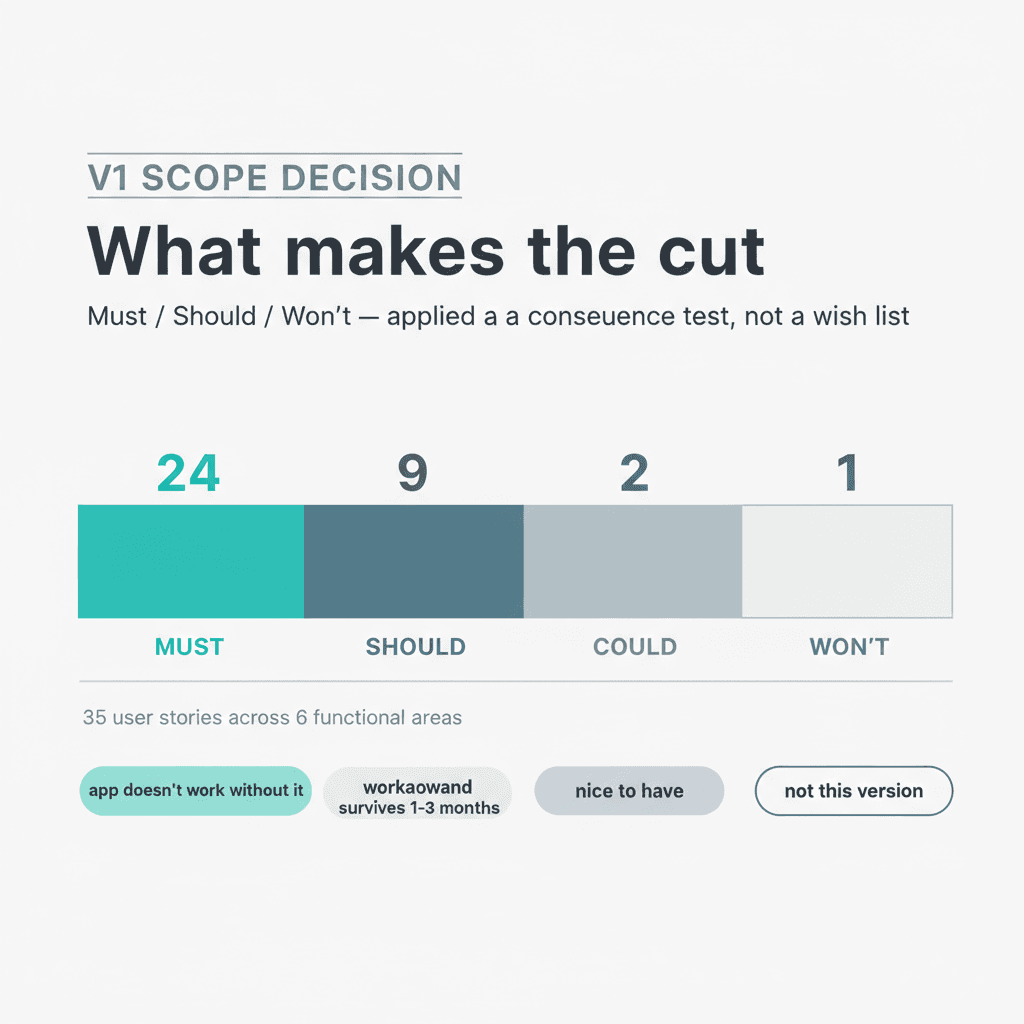
Must means the app doesn't replace the current system without it. If this story isn't in v1, the user can't stop using her Google Sheet for that workflow.
Should means she can work around the absence for 1-3 months. The gap is real but survivable. It ships in v1.1.
Could means no workaround is painful. It waits.
Won't means not in scope for any currently planned release.
Applied this way, the Must list is a test: does removing this story break the adoption path? If yes, it stays. If no, it's a candidate for deferral.
The initial sort came out at 23 Must. Then two things happened. One story got downgraded: the appointment confirmation view, which looked like a Must until I realized that patient search and the daily list together already surface what she needs (phone number, formality level) without a dedicated screen. And one story got upgraded in a way I didn't plan.
She mentioned the cash totals view unprompted, in the middle of a validation session about something else entirely. A monthly report showing how much came in as cash versus as transfers. Without it, there's no operational reason for her to care which payment method is which, which means the payment tracking feature loses a key part of its value. That story moved from Should to Must, and the count went to 24.
Final count: 24 Must, 9 Should, 2 Could, 1 Won't.
Seeing it in two dimensions
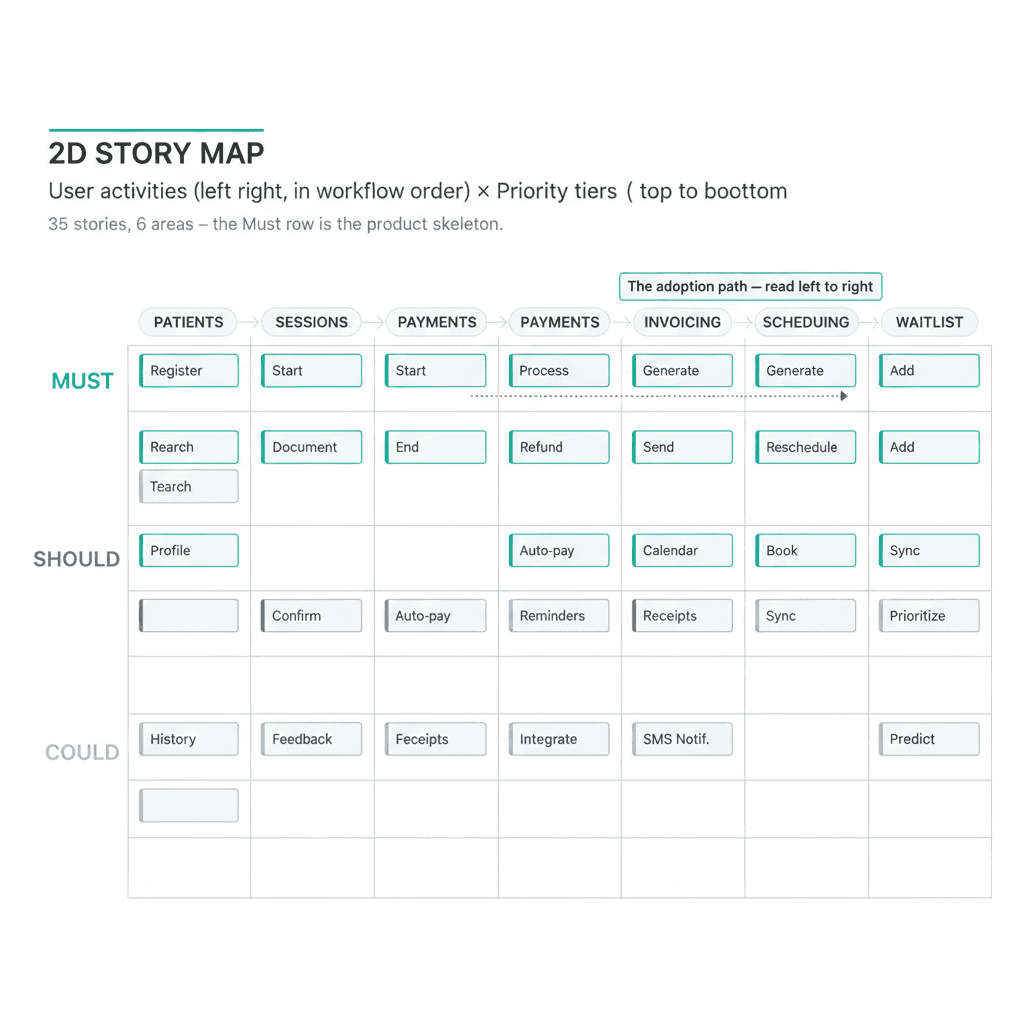
A MoSCoW list tells you what's in. A story map tells you how things relate.
I laid the 35 stories out on two axes. Horizontal: the user's workflow sequence, left to right (patients, sessions, payments, invoicing, scheduling, waitlist). Vertical: priority tier (Must at the top, Should below). Each story goes in the cell where its activity meets its tier.
Reading the Must row left to right gives you the skeleton of the product. You can trace a new patient from registration through their first session through payment confirmation through invoice sending, all in one horizontal strip. Any gap in that strip is a gap in the adoption path.
There weren't gaps. But the map made two things obvious that the list alone didn't. First, which areas were carrying the most weight: patient management and payment tracking together hold more than half the Must stories, because those are the two areas where the current spreadsheet is most operationally load-bearing. Second, which Must stories were close to the Should line, candidates for re-examination if the effort turned out higher than expected.
The map doesn't make the decisions. It makes the trade-offs visible before you start reasoning through them.
Adding the weight
The map tells me what to build. The effort estimates tell me whether the scope is realistic.
I sized each of the 24 Must stories on a T-shirt scale: S (1-2 days), M (3-5 days), L (1-2 weeks), XL (2-4 weeks). The v1 total came out to 76-120 development days. The wide range is deliberate: the 76-day optimistic assumes the data migration goes cleanly and the couples data model behaves as expected. The 120-day pessimistic assumes neither.
Three items concentrate the risk:
The data migration is the highest-risk item in the project. The user's spreadsheet has five years of operational history, and payment status and payment method are encoded in cell background colors, not in any text column. The migration has to read those colors correctly (green, black, purple, pink each mean something specific), and those mappings need to be confirmed with her in person before the script runs. Getting it wrong corrupts years of data. There's no shortcut.
The couples data model is an early build-phase risk. About 860 rows in the current system encode couples as two names in a single field, using a parentheses convention. The app has to parse this correctly and build a three-record relationship model. The logic that handles this is what couple-session billing depends on, so it needs to be built and tested early, before the rest of the system grows around it.
The payment indicator system is a medium-risk shared component. The current spreadsheet uses cell colors to show payment status. The app replaces that with explicit status indicators that have to appear consistently across several screens. Building it as a shared component is the right call, but shared components that touch many surfaces are where surprises tend to live.
The cuts that hurt
Some deferrals are obvious. Some cost something real.
The waitlist notification. When a patient cancels an appointment, the app should prompt her with the next person on the waitlist. It's a useful connection between two areas that otherwise don't talk to each other. What made it Should instead of Must: the core waitlist value (the FIFO list, the ability to add and manage entries, tappable phone numbers) is already in the two stories that did make Must. The automated prompt on cancellation is a workflow improvement, not a capability gate. She can open the waitlist manually when someone cancels. She will, at least for the first few months.
Advance payments. The spreadsheet currently tracks credit balances: patients who've paid ahead of upcoming sessions. Deferring this means v1 can't handle that cleanly. She can record advance payments as regular confirmed payments with a note and track the balance manually. It's a workaround. But this is a low-frequency scenario in her weekly payment activity, and adding the full credit-balance lifecycle to v1 would mean a new payment state, new UI flows, and more migration complexity. The workaround is tolerable for 1-3 months.
Contact management. People who've inquired but haven't booked yet. She's been managing these via WhatsApp for years, with no system at all. She can keep doing it. Adding a contact entity to v1 would mean an extra screen, an extra migration track, and a conversion flow when a contact becomes a patient. None of that is necessary for the core daily loop.
What v1 says yes to
The 24 Must stories cover the core daily loop: register a patient, log a session, confirm a payment, send an invoice, view the schedule, manage the waitlist basics.
The adoption plan leads with payment tracking as the hook, not the waitlist. The waitlist is genuinely something she wants. But she updates payment status multiple times every day as patients send receipts, checking who's paid, marking who hasn't, running her end-of-month cash totals. If the Pending Payments view works well on day one, she opens the app every day because she has to. That daily habit is what makes the rest of adoption follow.
The coexistence plan keeps the Google Sheet read-only but accessible for the first 3-6 months after v1 ships. This scope runs heavier than a typical MVP because the project has five years of historical data and an active practice behind it. The same techniques compress to ten to fifteen stories for a normal MVP; the shape holds. She's been using that Sheet for years and she's not going to trust the app unconditionally on day one. The Sheet stays as a safety net while trust builds.
The acceptance criterion for v1 is specific: she stops using the Sheet for daily operations. Not "she likes the app." Not "she finds it useful." She stops using the Sheet.
The value of written-down decisions
Scope is locked.
What I have now isn't just a list of stories. It's a document I can go back to during the build, when something that got deferred feels more urgent than it did during scoping, when the waitlist notification that went to Should looks like a glaring gap. The reasoning is in the doc. Why that story is Should and not Must. Why the adoption hook is payment tracking. Why the migration is XL and not L.
Some of those decisions will probably be wrong in retrospect. But being wrong on paper is a recoverable situation. Being wrong in code, three months in, with no record of why the trade-off was made, is a different conversation.
The spec phase doesn't just define what to build. Defining what NOT to build, and writing down why, is where the preventable surprises go.
#BuildInPublic #ClaudeCode #AIEngineering #AIAgenticEngineer