
The ML Development Lifecycle, SageMaker Services, and Model Evaluation Metrics for the AIF-C01 Exam

Task Statement 1.3 of the AWS AI Practitioner exam (AIF-C01) is the largest section in Domain 1. It covers the entire machine learning development lifecycle: from defining a business goal through data collection, model training, deployment, monitoring, and MLOps automation. It also covers every evaluation metric you need to know for the exam. This post walks through each phase, maps AWS services to each step, and breaks down the metrics with formulas and use cases.
The ML Pipeline as a Lifecycle
An ML pipeline is a series of interconnected steps that start with a business goal and finish with a deployed, monitored model. The stages are: define the problem, collect and prepare training data, train the model, deploy, and monitor.
The key word is lifecycle. ML models are dynamic by design. They get re-trained with new data, evaluated against performance and business metrics, monitored for drifts and bias, and adjusted or rebuilt as needed. Parts or all of the pipeline repeat even after deployment.
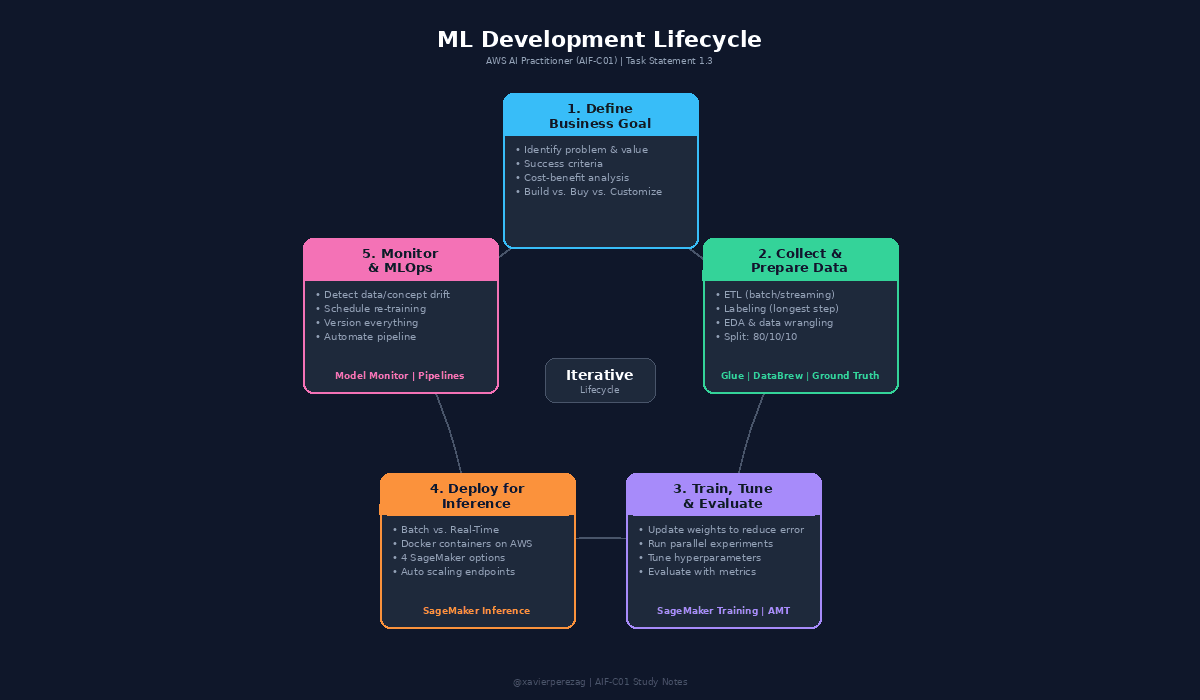
ML Development Lifecycle diagram showing the 5 phases in a circular flow with AWS services mapped to each phase.
Phase 1: Define the Business Goal
Every ML project starts with identifying the business goal. You need a clear picture of the problem to be solved and the business value to be gained. Without specific business objectives and success criteria, you cannot evaluate the model or determine if ML is the right solution.
This phase includes aligning stakeholders, evaluating whether ML is the right approach, and performing a cost-benefit analysis. Formulate the ML question in terms of input, desired outputs, and the metric to optimize. Start simple before adding complexity.
Build vs. Buy vs. Customize
The exam tests a three-tier decision path for solution approach.
Option 1: Use a Fully Managed AWS AI Service. This is the simplest path. AWS offers pre-trained models as pay-as-you-go services. Evaluate these first. Many allow output customization. Example: Amazon Comprehend lets you create a custom classifier using your own training data.
Option 2: Fine-Tune a Pre-Trained Model. If a managed service does not meet objectives, build on top of an existing model using transfer learning. Amazon Bedrock lets you start with a foundation model and fine-tune it with your own data for generative AI. Amazon SageMaker JumpStart provides pre-trained models for computer vision and NLP that you can fine-tune with incremental training.
Option 3: Train a Custom Model from Scratch. The most difficult, costly, and technically challenging approach. Requires the most responsibility for security and compliance. Only pursue this when the other options fall short.
Phase 2: Collect and Prepare Training Data
Data Collection
Identify what training data is needed and where it lives. Determine if data is streaming or batch. Configure a repeatable ETL (Extract, Transform, Load) process to pull data from multiple sources into a centralized repository. The process must be repeatable because models should be re-trained frequently. Labeling is often one of the longest parts of the process because accurately labeled data rarely exists already.
Data Preparation
Use Exploratory Data Analysis (EDA) with visualization tools to understand the data. Filter out or repair missing or anomalous values. Mask or remove PII data. Then split the data: 80% for training, 10% for evaluation, and 10% for final testing before production deployment.
Feature Engineering
Determine which characteristics of the dataset should be used as features. Use only the subset that minimizes the error rate. Features can be combined to reduce the total count, which reduces memory and computing power required for training.
AWS Services for This Phase
AWS Glue is a fully managed ETL service. It discovers data, stores metadata in the AWS Glue Data Catalog, and generates transformation code. The Data Catalog stores references (location and schema), not the source data itself. AWS Glue DataBrew is a visual, no-code data preparation tool with 250+ built-in transformations and smart suggestions for data quality issues.
Amazon SageMaker Ground Truth builds labeled training datasets using active learning: an ML model auto-labels data it can handle, and routes uncertain items to a human workforce (Amazon Mechanical Turk or a private team). Amazon SageMaker Canvas provides a visual interface for feature engineering with 300+ built-in transformations. Amazon SageMaker Feature Store is a centralized repository for features and metadata, enabling reuse across ML projects.
Phase 3: Train, Tune, and Evaluate
During training, the algorithm updates internal numbers called parameters (or weights) so the model's output matches expected results. This cannot happen in one pass. The algorithm watches outputs from previous iterations and shifts weights in the direction that lowers the error. Training stops when a defined number of iterations have run or the change in error falls below a target value.
Best practice is to run many training jobs in parallel using different algorithms and settings. This is called running experiments. Each algorithm has hyperparameters: external settings (like the number of neural layers) set by data scientists before training. Optimal values can only be found by running multiple experiments.
AWS Services for This Phase
Amazon SageMaker Training Jobs run training code on managed ML compute instances. You specify the S3 bucket with training data, compute resources, output bucket, the algorithm as a Docker container image in Amazon ECR (Elastic Container Registry), and hyperparameters. Amazon SageMaker Experiments tracks and compares thousands of training runs visually. Amazon SageMaker Automatic Model Tuning (AMT) automates hyperparameter search by running many training jobs across hyperparameter ranges and selecting the combination that maximizes a metric you choose.
Phase 4: Deploy for Inference
The first decision is batch vs. real-time. Batch inference processes large datasets offline (e.g., overnight on yesterday's sales data) and is the most cost-effective. Real-time inference responds immediately via a REST API over HTTP.
In both cases, inference code and model artifacts are packaged as Docker containers. AWS compute options include AWS Batch, Amazon ECS, Amazon EKS, AWS Lambda, and Amazon EC2.
SageMaker Inference Options
SageMaker reduces operational overhead by fully managing endpoints. Point it at S3 (artifacts) and ECR (container), choose an inference option, and SageMaker handles the rest. Four options are available, all fully managed with auto scaling:
Batch Transform: Offline inference on large datasets with no persistent endpoint.
Asynchronous Inference: Queues requests and scales the endpoint down to zero during idle periods.
Serverless Inference: Uses Lambda with no instance provisioning, ideal for intermittent traffic.
Real-Time Inference: Persistent REST API endpoint for sustained, interactive traffic.
Phase 5: Monitor and MLOps
Model performance degrades over time from two types of drift. Data drift is a significant change in the data distribution compared to training data. Concept drift is when the properties of the target variables change. Both result in performance degradation.
Amazon SageMaker Model Monitor detects these issues. You define a monitoring schedule that collects data from endpoints, compares it against a baseline using built-in or custom rules, surfaces results in SageMaker Studio, and sends alerts to Amazon CloudWatch for remediation (like triggering re-training).
MLOps
MLOps applies software engineering best practices to ML: infrastructure as code, version control for everything (including training data), deployment monitoring, and automated re-training. Benefits include productivity, repeatability, reliability, compliance/auditability, and data quality enforcement.
Amazon SageMaker Pipelines orchestrates the full lifecycle into reproducible, conditional pipelines with artifact lineage tracking. Additional orchestration options include AWS Step Functions (visual serverless workflows) and Amazon MWAA (managed Apache Airflow).
Model Evaluation Metrics
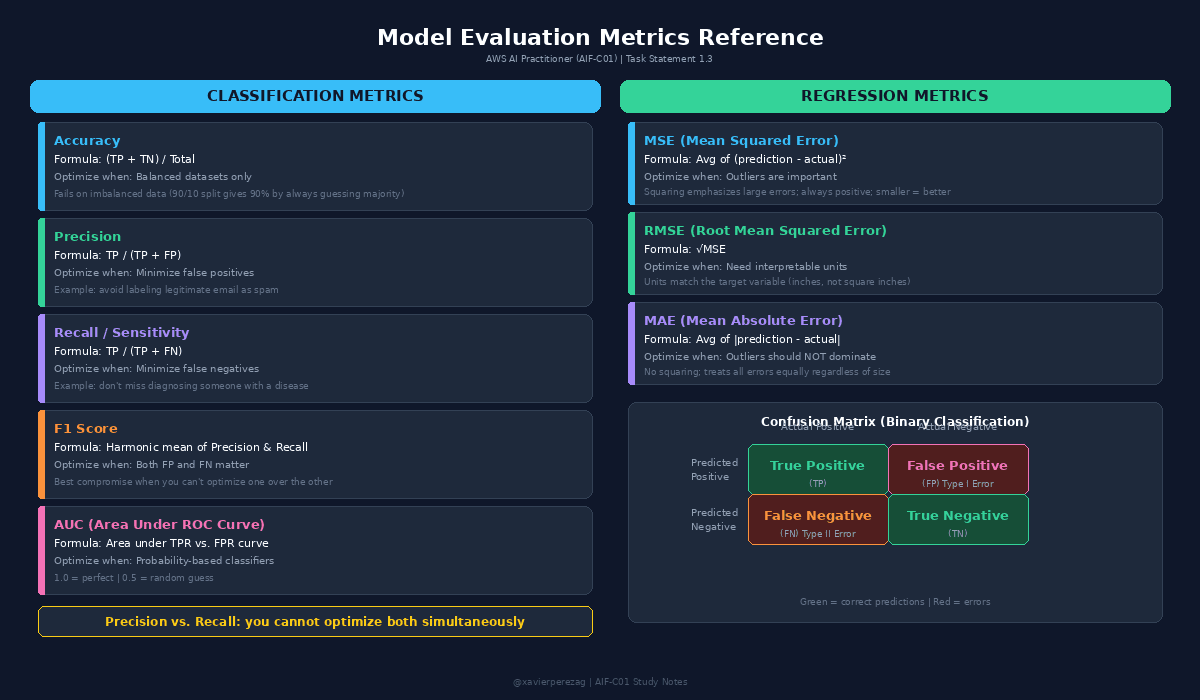
Model Evaluation Metrics reference card showing classification metrics, regression metrics, and the confusion matrix.
The Confusion Matrix
For binary classification, the confusion matrix has four outcomes. True Positive (TP): correctly predicts positive. True Negative (TN): correctly predicts negative. False Positive (FP): predicts positive when actually negative. False Negative (FN): predicts negative when actually positive.
Classification Metrics
Accuracy = (TP + TN) / Total. The percentage of correct predictions. Not useful on imbalanced datasets.
Precision = TP / (TP + FP). Optimize when minimizing false positives is critical (e.g., spam filtering).
Recall (Sensitivity) = TP / (TP + FN). Optimize when minimizing false negatives is critical (e.g., disease diagnosis).
F1 Score balances precision and recall. Use when both false positives and false negatives matter.
AUC plots TPR vs. FPR across all thresholds. Score of 1.0 is perfect; 0.5 is random.
Regression Metrics
MSE averages squared differences between predictions and actual values. Emphasizes outliers.
RMSE is the square root of MSE, with units matching the target variable (easier to interpret).
MAE averages absolute differences. Does not emphasize outliers.
Business Metrics and ROI
ML solutions must tie back to measurable business value. Good business metrics include cost reduction, percentage increase in users or sales, and measurable improvement in customer feedback. After deployment, compare actual results against original goals and calculate return on investment. Use AWS cost allocation tags on all pipeline resources and filter in AWS Cost Explorer to determine exact project costs.